A link is an interactive text element that navigates the user to a new location. This destination can be another page, a specific section within the current page, an external website, or a resource to be downloaded.
When to use
When to avoid
Specifications
Variations


Behavior
Navigation

Clicking a link navigates the user to the destination specified in its "href" attribute.
External link

Links that navigate to an external website or domain should be accompanied by an "external link" icon to inform the user they are leaving the current site. This helps manage user expectations.
Anatomy
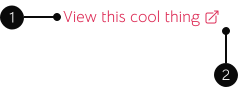
1
Link text
The descriptive, clickable text that informs the user about the link's destination.
2
Icon (Lead / Trailing)
An icon, typically placed after or before the text, to provide additional context (e.g., an external link icon, a download icon).